Maa Parvati AI Video Prompt (HD Realistic) – Full ChatGPT + Google Flow Guide | Trending Insta Prompts

Generate Viral 3D Images with this AI Prompt
Looking for the perfect Maa Parvati AI Video Prompt (HD Realistic) – Full ChatGPT + Google Flow Guide | Trending Insta Prompts? You've found the ultimate source. At TrendyInstaPromts, we curate the most viral, trending AI image generation prompts for Instagram, WhatsApp, and Facebook. Simply copy the prompt below and paste it into Microsoft Bing Image Creator, ChatGPT 4, or Midjourney to create your own personalized 3D illusion art instantly!
AI photo and video editing tools have made it possible to turn an everyday selfie into a stunning divine portrait within minutes. One of the most loved creative trends right now is the Maa Parvati-inspired AI look — rich red sarees, intricate gold jewellery, flowing hair, a Himalayan backdrop, and soft cinematic lighting. In this guide, you’ll get a sharp, ultra-realistic HD image prompt along with three ready-to-use video prompts that turn your AI photo into a 30-second devotional cinematic reel, while keeping your face exactly the same across every frame.
Why This Maa Parvati AI Trend Is Going Viral
This style is trending across Instagram Reels and YouTube Shorts because it blends hyper-realistic AI visuals of Maa Parvati and Mahadev with an emotional devotional soundtrack. The combination of a Himalayan setting, detailed traditional jewellery, dramatic camera movement, and a soulful bhajan in the background gives the video a genuinely cinematic, temple-like feel that resonates deeply with Indian audiences.
Maa Parvati AI Photo Prompt (Sharp Realism, HD) (use this image prompt first)
Upload a clear, well-lit photo of your face as the reference image, then paste the prompt below into your preferred AI image tool. This version is written for maximum sharpness, natural skin texture, and photographic realism — not a painted or cartoon-like output.
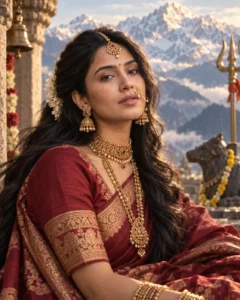
Transform the uploaded reference photo into a hyper-realistic, sharp HD portrait inspired by Devi Parvati. Preserve the exact facial identity, bone structure, skin tone, and natural facial features from the reference photo — do not alter or beautify the face, only enhance lighting and skin clarity. Style her with long, flowing jet-black hair, a detailed golden maang tikka, a nath (nose ring) with a delicate chain, layered traditional gold jewellery including a choker and jhumkas, and a deep maroon-red silk saree with intricate zari (golden) embroidery on the border. Place her against a majestic Himalayan backdrop with soft snow-capped peaks, light mist, and a gentle golden-blue cinematic glow. Expression should be calm, serene, and quietly powerful. Render in ultra-sharp 8K detail with realistic skin pores, fabric texture, and natural fine hair strands, true-to-life color grading, soft rim lighting, no plastic or airbrushed look, photorealistic DSLR quality, portrait orientation 4:5.
How to Create the Maa Parvati AI Image
- Open ChatGPT (or any AI image tool that supports image + text prompts) and start a new chat.
- Upload a clear, front-facing photo of yourself where your face is well lit and visible.
- Copy the Maa Parvati HD image prompt given above.
- Paste the prompt into the same chat, right after your uploaded photo.
- Send the prompt and wait for the tool to generate the image.
- Check the result closely — the face should still look like you, with the saree, jewellery, and background matching the description.
- If something looks off, ask the tool to fix only that part (for example, “keep the face exactly the same, only fix the jewellery”).
- Regenerate if needed until you get a sharp, clean, high-resolution result.
- Download and save the final image — you’ll use this as the reference frame for your video.
Turn the AI Image Into a 30-Second Cinematic Video
Use the three prompts below as separate 10-second clips in Google Flow (or any similar frame-to-video tool). Each prompt is written to keep your face 100% consistent with the reference image across every single shot, so the final video looks like one continuous character, not a different face each time.
Video Prompt 1 — 0 to 10 Seconds
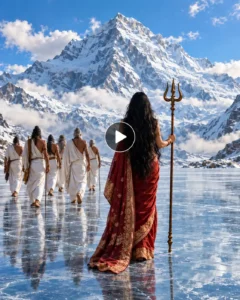
Generate a 10-second photorealistic cinematic clip in vertical 9:16 format, 1080×1920 resolution, 24fps, using the uploaded reference image as the fixed facial identity for the woman — her face must stay identical to the reference photo in every frame, no changes to facial structure. Open on a macro shot of an ancient bronze trishul half-buried in cracked Himalayan ice, frost drifting around it. Slowly tilt the camera upward as a deep maroon-red embroidered saree enters frame, snow-covered peaks softly out of focus behind her. Reveal the woman with the exact reference face, hair moving naturally in the cold wind, wearing the gold nath and maang tikka, her expression shifting between sorrow and quiet strength. Cut to a wide shot of robed sages walking across a frozen glacier, led by an elder with long white hair and beard. Show an over-the-shoulder shot as he approaches her and raises his hand in blessing, a faint glow of light around him. Close on her face as sorrow turns into fierce resolve, hair whipping in the wind. Keep lighting cinematic and dramatic, motion smooth and controlled, skin and fabric textures photorealistic. No background music, no captions, no text overlays, no watermark.
Video Prompt 2 — 10 to 20 Seconds
Generate a 10-second photorealistic cinematic clip in vertical 9:16 format, 1080×1920 resolution, 24fps, continuing with the same woman and using the uploaded reference image to keep her face perfectly identical throughout — no drift in identity, features, or skin tone across shots. Open on a close-up of her wearing an ornate golden crown with crescent-moon details, expression fierce and warrior-like. Cut to a dim, ancient stone Shiva temple lit by flickering firelight, where she performs an intense classical dance in her red saree, her veil and hair swirling with realistic motion blur. Reveal a massive dark stone Shiva statue holding a trident behind her as smoke and embers drift through the temple air. Show an emotional close-up during the dance with natural skin texture and warm firelight reflected in her eyes. In slow motion, show her swirling a long red silk veil that catches the firelight. Transition to the snowy Himalayan outdoors as she looks up toward bright sunlight breaking through clouds. End on an extreme close-up of her eyes with fine white tilak markings near the eyes and forehead, detailed brown irises reflecting the snow peaks, a subtle divine golden glow rising on her face as her eyes slowly open. Photorealistic detail throughout, smooth cinematic transitions, no background music, no captions, no text, no watermark.
Video Prompt 3 — 20 to 30 Seconds
Generate a 10-second photorealistic cinematic clip in vertical 9:16 format, 1080×1920 resolution, 24fps. Open on a macro shot of a realistic cobra with fine scale detail and a flickering tongue under cool blue-white divine light. Slowly reveal it coiled around the neck of Lord Shiva, his skin a deep realistic blue tone. Move down to his muscular torso layered with rudraksha malas, subtle divine aura around him. Cut to a close-up of his hand gripping the ancient trishul. Tilt upward to reveal his face — long matted jata hair, a crescent moon resting in it, an expression of calm and immense power. Show a close-up of his forehead with three horizontal white Tripundra lines and a central red tilak. Move into an extreme close-up of his eyes conveying ancient wisdom and stillness, fine ash particles and light sparks drifting around him. Finish on a wide, low-angle epic shot of Shiva standing against bright clouds and snowy Himalayan peaks, trident raised, the cobra’s hood lifted while he remains perfectly calm. As he raises the trishul, brilliant light breaks through the clouds forming a halo around him, then slowly fade to black. Photorealistic 8K-level detail on skin, hair, rudraksha, metal and snow, dramatic cinematic lighting, epic scale, smooth natural motion. No background music, no captions, no text, no watermark.
How to Generate the Video Using Google Flow
- Open Google Flow in your browser and sign in with your Google account.
- Start a new project and select Frames to Video.
- Choose Omni Flash as the generation model.
- Set the aspect ratio to vertical (9:16) to match the prompts above.
- Upload your AI-generated Maa Parvati image as the starting reference frame.
- Paste Video Prompt 1 and generate the first 10-second clip.
- Repeat the same steps with Video Prompt 2 and Video Prompt 3, always using the same reference image so the face stays consistent.
- Review each clip — if the face or jewellery drifts from the reference, regenerate that clip before moving on.
- Download all three clips once you’re happy with the results.
Tips to Make the Video Look More Professional
- Stick to slow push-ins, gentle pans, or smooth reveals instead of fast camera moves — this keeps the face and identity stable across frames.
- Always feed the same reference image into every clip so the AI doesn’t drift away from your actual face.
- Stitch the three 10-second clips together in order for one smooth 30-second story arc.
- Add the devotional track and light color grading in your video editing app (CapCut, VN, or Premiere) after exporting from Flow.
- Keep transitions simple — a hard cut or a quick crossfade works better than flashy effects for this devotional style.
Conclusion
This Maa Parvati-inspired AI prompt set gives you a simple way to turn your own photo into a sharp, hyper-realistic devotional portrait and then extend it into a full 30-second cinematic video. Keep your reference photo clear, reuse the same image across all three video prompts, and avoid overly fast camera motion to keep your face consistent from the first frame to the last. With these prompts, you’re ready to create a polished, shareable Maa Parvati AI video for Instagram, YouTube Shorts, or Facebook Reels.
How to use this prompt?
- Copy the exact prompt text shown above.
- Open Bing Image Creator or your favorite AI generator.
- Paste the text, replace any names (like 'Your Name') with your own details.
- Hit generate and download your viral 3D image!
Check out our homepage for hundreds of other trending Instagram AI prompts updated daily.